Why generic Garmin profiles miss football
If you start an Outdoor Run, Interval Run or HIIT activity on your Garmin during a football match, the watch will record time, distance and heart rate accurately. What it will not do well:
- Detect individual sprints — Garmin’s algorithms treat speed changes as part of an averaged pace, not as discrete sprint events.
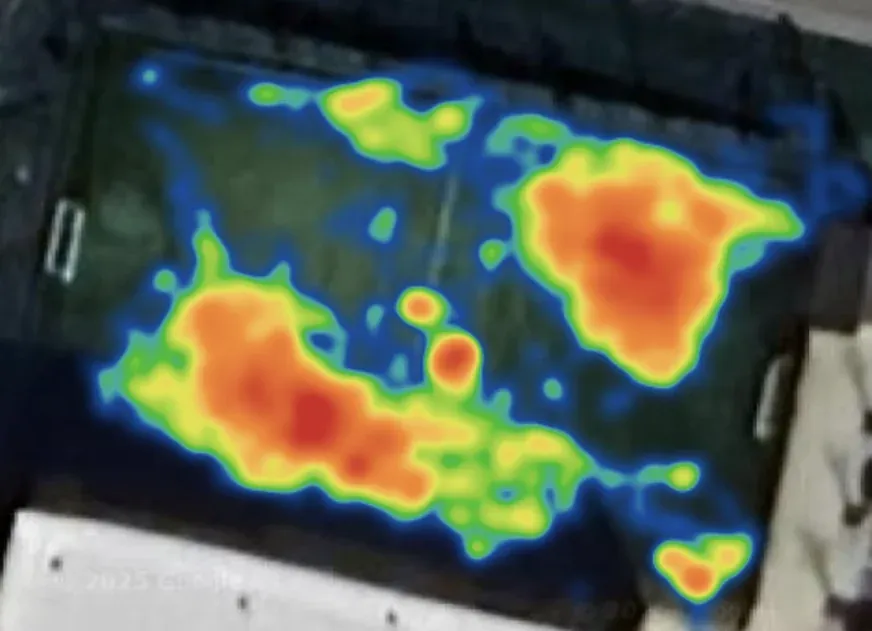
- Track pitch position — Garmin captures coordinates but has no concept of a pitch, so there is no zone-mapping, no heatmap, no “you spent 18 minutes in the opposition half”.
- Separate the halves — your activity is a single block from kick-off to full time.
- Count accelerations and decelerations as work — the same smoothing that makes Garmin great for steady running filters short bursts out of the calorie and load calculations.
The result is an activity that looks like any other mixed-intensity outdoor session. Useful for training load. Not useful for understanding what happened in your match.
The honest gap: same sensors, different algorithm
Garmin’s GPS chip and optical heart rate sensor are best-in-class. Scorza does not replace them or claim better readings — we use exactly the same raw data the watch is already capturing. What is different is the processing layer.
Garmin’s algorithms are tuned for endurance. The assumption is that a runner or cyclist travels in roughly consistent directions at roughly consistent speeds. Sudden changes get smoothed as sensor noise — that is exactly the right call for ultramarathons, and exactly the wrong call for football, where the sudden changes are the activity.
Scorza inverts that. Short sharp turns, hard accelerations and decelerations, repeated direction changes — instead of being smoothed away, they are preserved and counted. A 4-second sprint to chase a clearance gets counted as a sprint, not folded into average speed. Forty direction changes during a press get tracked individually instead of being averaged into “moderate effort”. The intensity work that defines football stops being invisible.
“We use the same Garmin data the watch already collects. We just do not smooth out the moments that make football football.”
What Scorza on Garmin actually tracks
Scorza is a Connect IQ app that runs on your Garmin during the match. You start it before kick-off. It uses your Garmin’s GPS and optical heart rate sensor to capture everything across 90 minutes, then processes it through a football-specific algorithm.
What you get after the match:
- Total distance — football-tuned processing of the same GPS signal your Garmin already records.
- Sprint count — discrete sprint efforts identified, not folded into average speed.
- Sprint speed — peak speed per match and per sprint.
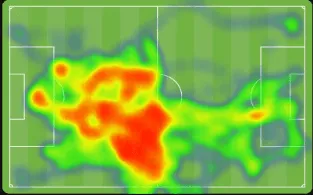
- Heatmap — your pitch coverage visualised by zone.
- Heart rate zones — time spent in each zone, broken out.
- Match segmentation — first half and second half compared side by side.
- Match log entry — every game saved with team names, shirt colours, final score and venue, so the season becomes a searchable diary instead of a stream of disconnected workouts.
Comparing activity in Garmin vs Scorza
Garmin Connect
Scorza
Why the vest matters too
The algorithm is the bigger story. The vest is a smaller, complementary piece.
GPS signal quality is better when the watch sits flat on your back than when it bounces on your wrist. Wrist movement during a match — arm swing, tackles, throw-ins — adds noise that distorts the path GPS calculates. With the watch in the Scorza vest pocket on your back, the signal more accurately reflects how your body moved across the pitch. That is what makes the heatmap work properly.
Compatible Garmin models
| Series | Compatible models |
|---|---|
| Forerunner | 245 and above (245, 255, 265, 945, 955, 965) |
| Fenix | 6 and above (Fenix 6, 7, 8 series) |
| Venu | Venu 2, 3, 4 and above |
| Vivoactive | Vivoactive 3, 4, 5 and above |
| Instinct | Instinct 2 and above |
Check scorza.com for the latest compatibility list — new Garmin models are added as they are validated.
How match data lands in Garmin Connect
After your match, Scorza syncs the session to Garmin Connect as a completed activity. It appears in your activity history like any other recorded workout. From there:
- Weekly intensity minutes are updated — a 90-minute match contributes significantly to your moderate and vigorous totals.
- Training load is updated — the match registers the accumulated stress on your system.
- Training status adjusts based on the new load data.
Without the match logged, Garmin Connect has a hole in your week. Your training load does not know you played. Your Training Status does not know you were at match intensity for 90 minutes.
How it factors into Body Battery
This is the most immediately visible improvement for Garmin users.
Body Battery is Garmin’s energy-level metric — built on heart rate variability, activity load and sleep. If you play a match but do not track it, Garmin does not see the effort. You might notice a mysterious overnight Body Battery drop with no logged cause — Garmin can tell from your resting HRV that something happened, but it cannot explain it.
Track the match with Scorza, and the story is complete. Body Battery drops reflect the actual match effort. Recovery the next day is calibrated to what you actually did. Suggested steps and recovery time are based on real data, not a guess.
How to install Scorza on your Garmin
Scorza is available on the Garmin Connect IQ store. Installation takes about two minutes:
- Open the Connect IQ app on your phone (or visit the Connect IQ store in Garmin Connect).
- Search for Scorza.
- Install the app to your compatible watch.
- Complete setup in the Scorza phone app.
- Put the watch in your Scorza vest pocket before kick-off.
No pairing with a separate device. No pod to charge. No additional hardware.